ChatGPT Personal Data Masking: A 3-Second Check Before You Paste
Published 2026-10-20 · Updated 2026-10-20 · 8 min read · ShooWork (FREECO CO., LTD.)
Most personal data that ends up in ChatGPT was never a decision. A 3-second check, a column-names-only prompt and placeholders to keep it out.
If you searched this, your cursor is probably hovering over paste right now, and a small voice is asking: is it actually okay to put this in ChatGPT? Here's the short answer. The danger usually isn't the secret you consciously decide to share. It's everything that rides along when you copy a whole thread, a whole PDF or a whole screenshot. Most personal data that ends up in AI chats was never a decision. It was a shortcut.
At ShooWork we run our own AI tool platform, including a video-editing engine and ads tooling, and our team talks to AI models dozens of times a day. When the AI-leak headlines started, I didn't go read studies. I did something more boring. I scrolled back through my last 30 conversations and counted what I had actually pasted. The numbers were embarrassing.
The follow-up surprised me more. I took the 11 chats where I'd included real people's names, swapped every name for “Colleague A” or “Client B”, and asked again. In 10 of the 11, the conclusion and the recommended steps came back the same. The names, phone numbers and addresses added nothing. Below: a 3-second check before pasting, six things that slip in and how to strip them, a prompt that asks AI which columns to delete before you share a single row, and what to do if you've already pasted.
I Audited 30 of My Own ChatGPT Chats. Here's What Went In.
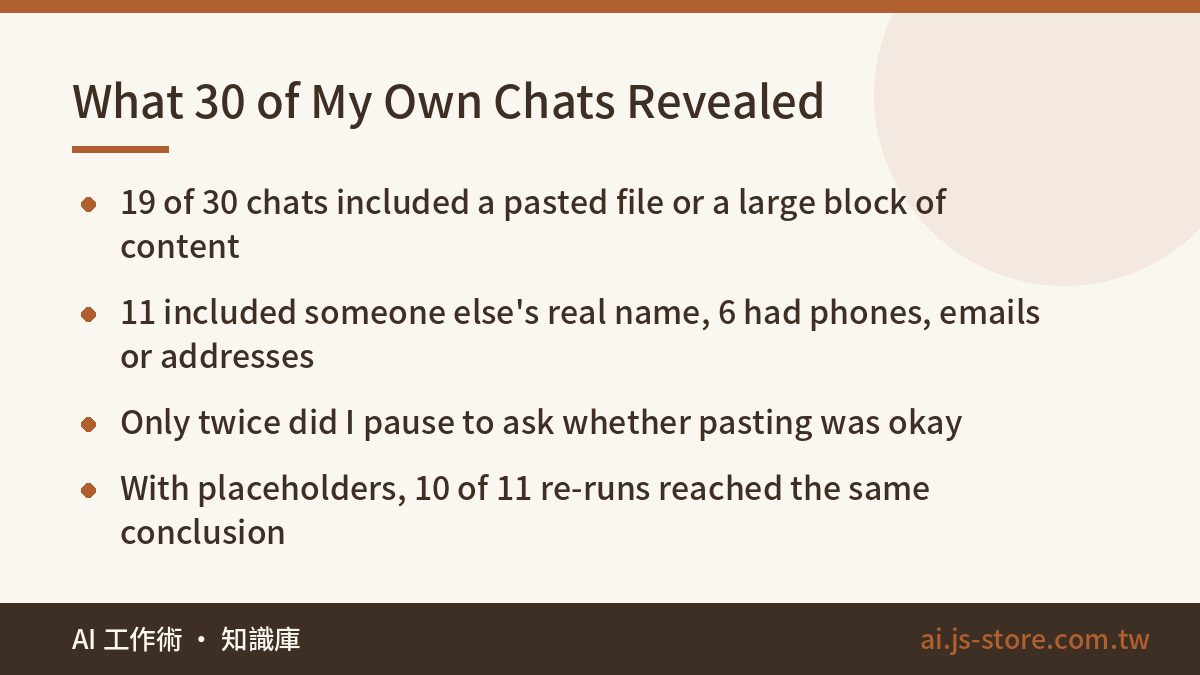
Where these numbers come from: no study, no news report. I counted my own history, using categories I made up. One person's log, not a statistical sample.
- Pasted a file or a large block of content: 19 of 30
- Included someone else's real name: 11
- Included a phone number, email or street address: 6
- Included pricing, unit costs or contract terms: 4
- A screenshot showing the last digits of my own account: 1
- Times I paused to ask “should I be pasting this?”: 2
Two out of thirty. That's the number that matters. It tells me this isn't a knowledge problem. I know what personal data is. I just wasn't thinking when my hand moved. Your numbers will be different, so open your own last 10 conversations and count. It takes under ten minutes and will hit harder than anything I write here.
One misconception to clear up: the risk isn't that your chats get published. Mainstream platforms don't do that. The realistic risks are three: your chats may be used to train future models, a hijacked account exposes your entire history at once, and your employer's or client's contract may already forbid sharing that data with outside tools. All three are manageable. None is a reason to stop using AI.
The 3-Second Check Before You Hit Paste
No checklist, no browser extension, no policy document. While your finger hovers over paste, ask one question:
“If I strip out the names, can it still answer this?”
- Yes → strip them, then paste.
- No → that's information it genuinely needs. Share it and stop worrying.
This works because it swaps the question. “Is this sensitive data?” is a legal question you can't settle in three seconds, so you default to pasting. “Does this help the answer?” you can answer instantly, and usually the honest answer is that nothing forced you to paste it. You just didn't feel like deleting it.
The check works best for judging, rewriting, classifying and summarizing, which covers most everyday AI use. If you want a letter addressed to a specific person, the name has to go in. Then the better question isn't whether to mask. It's whether that letter should be AI-written at all.
Six Things That Ride Along When You Paste (and the 10-Second Fix)
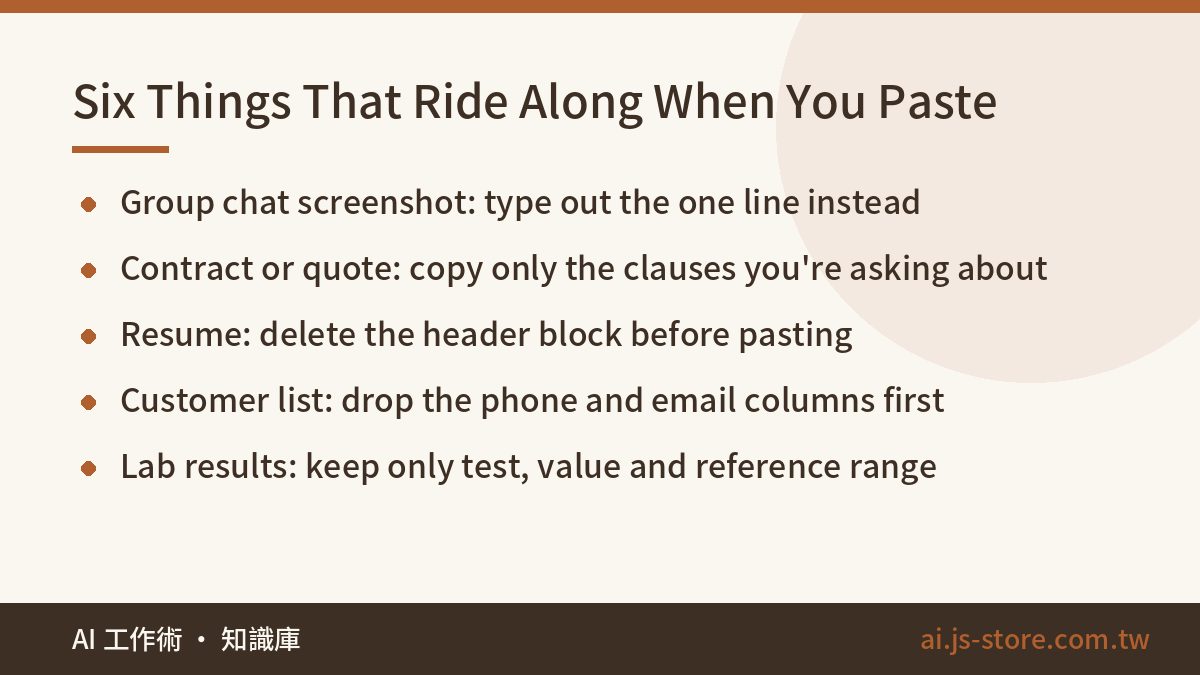
Screenshot this table and keep it on your phone. Left: what you think you're pasting. Middle: what goes along with it. Right: a ten-second fix.
| You think you're pasting | What also goes in | 10-second fix |
|---|---|---|
| A group chat screenshot (“how do I reply?”) | Group name, everyone's display names and avatars, sometimes phone numbers | Type out the one line you're asking about |
| A quote or contract PDF (“is this clause bad for me?”) | Client letterhead, tax ID, unit prices, payment terms, contact details | Copy only the clauses you're asking about |
| A resume (“make this better”) | ID number, birthdate, home address, past salary, references' phones | Delete the header block. It's fixing your writing, not your address. |
| Lab results (“what do the red numbers mean?”) | Your name, patient ID, clinic and doctor's name | Paste only test, value and reference range |
| A customer list spreadsheet (“sort these”) | Whole columns of phones and emails, often thousands of rows | Delete those two columns first. Sorting never uses them. |
| A banking or receipt screenshot (“log my expenses”) | Account and card digits, merchant locations, a timeline of your movements | Type amount and item as text, one line per entry |
See the pattern? Nothing in the middle column is needed to answer your question. The customer list is where I was worst. To segment customers or calculate average order value, the model needs two columns: last order date and total spend. Phones and emails never enter the math. If you live in spreadsheets, our guide to AI Excel automation shows how to describe your data's structure so you paste far less of it.
Not Sure Which Columns It Needs? Send Only the Column Names
This is where most people get stuck: “I don't know which fields it'll use, so I'll paste everything.” There's a safer order. Before you paste a single row, send only the column headers and ask which ones you can delete. Delete them, then paste.
I have a file I need help with, but I'm not pasting the contents yet.

The task: split this customer list into two groups, "ordered in the
last 12 months" and "no order in over a year", and give the count and
average spend for each group.

Column names only (no actual records):
Name, Mobile, Email, Address, Company, Tax ID, Last Order Date,
Total Spend, Account Manager, Notes

Answer only these three questions. Don't start the analysis yet:
1. Which columns are strictly required for the task?
2. Which columns make no difference? I'll delete them before pasting.
3. Will deleting them make your answer worse? If yes, say exactly
   which part gets worse.

Do not tell me to "paste the full file so you can judge better."
If you genuinely need more information, name the one thing you need.

(Task and columns are an example. Swap in your own.)
That “do not tell me” line is the one that matters. Models lean hard toward “more data, better answer.” Leave it unblocked and it will usually suggest uploading the whole file, and you'll cave. Make “don't ask for the full file” an explicit rule and it answers the question you actually asked: which columns can go.
When It Needs Context, Use Placeholders. Ten Seconds, No Code.
Some questions need the full story, like how to reply in a tense email thread between you, a client and a vendor. You can still paste it. Swap in placeholders first:
- In Word, Google Docs or any text editor, use Find and Replace All (Ctrl+H on Windows, Cmd+Shift+H on Mac). Replace people, companies and phone numbers with A, B, C.
- Keep the key (who Company A is, who Contact B is) on your own machine. Never paste it into the chat.
- Open your message with a short notice so the model doesn't invent names to fill the gaps:
Names, company names and phone numbers below have been replaced with
placeholders (Company A, Contact B, Mr. C). I did this on purpose.
Answer using the placeholders. Don't ask me for the real names, and
don't make up names of your own.
If you do this often, put that notice in your custom instructions once and stop retyping it.
Don't do it the other way around. The most common mistake I see is “please mask the personal data first, then analyze.” By the time you ask, the full, unmasked text has already been sent. The model can't reach into your laptop and redact things before reading them. Masking only happens on your own device, before you hit send, and Find and Replace is all it takes.
Already Pasted It? Three Steps, in This Order
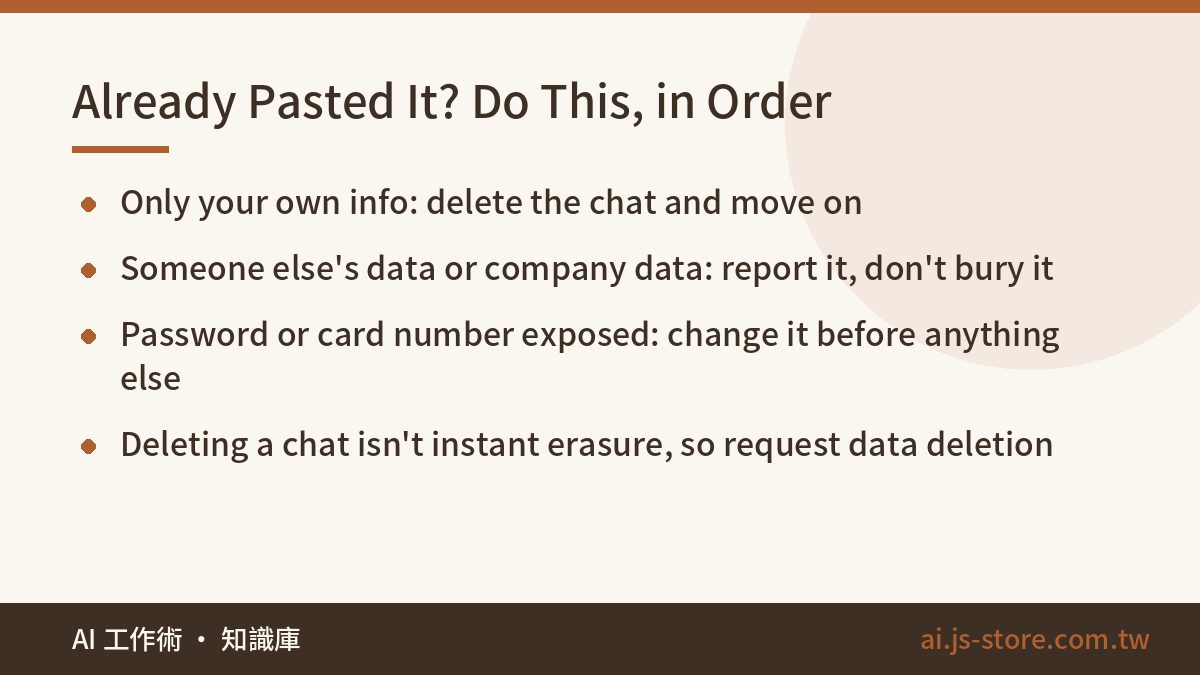
- Figure out what kind it is. Only your own stuff, like your schedule or a draft? Delete the conversation and move on. Someone else's personal data or company data? That needs reporting. Check your company's policy and don't quietly bury it.
- If a password, account number or card number went in, change that password first and call your bank if needed. This matters far more than deleting the chat.
- Deleting a chat doesn't wipe it everywhere right away. Most platforms state that deleted data is retained for a period. For genuinely sensitive content, find the data deletion request in privacy settings or contact support.
And to be straight about this article's limits:
- The numbers come from counting my own chats. They are not research data.
- “Same result in 10 of 11” means same conclusion and steps, not word-for-word. AI phrasing varies every run anyway.
- I'm not a security professional or a lawyer. This is everyday self-protection, not compliance advice. If your company has a policy, it wins. Healthcare, finance and legal work have their own rules.
FAQ
Q: Can I ask ChatGPT to remove personal data before it analyzes my text?
No. It's an ordering problem. The moment you ask, the full text has already been sent, so any masking happens on data that's already uploaded. Do it yourself with Find and Replace. It takes about ten seconds.
Q: Where is the setting that stops ChatGPT from training on my chats?
It moves between redesigns and differs by provider, so I won't give a click path that'll be stale next month. Search settings for “training”, “improve the model” or “data controls”. Broadly, consumer plans tend to have it on by default and business plans off, but trust today's official documentation. If this affects your plan choice, see ChatGPT free vs paid.
Q: Will placeholders make the AI's answers worse?
In my 11 re-runs, 10 came back with the same conclusion and steps. Only the labels changed. Judging, rewriting and classifying are barely affected. If a task truly needs a real name, give it, and ask whether that task should be AI-written.
Q: If I delete a conversation, is the data really gone?
Not necessarily. Most platforms keep deleted content for some period, and details vary, so check the official terms. Deleting stops the bleeding. It doesn't undo anything. Handle passwords and financial accounts first, then request deletion for anything truly sensitive.